
Everything built into Arciin.
Features
Arciin is more than storage — drag-and-drop uploads, smart libraries, AI models, vision chat, mobile, domains, vault, API keys, and live activity on the server you control.
Your server, your controlWhat's included
Libraries & uploads
Auto-sort into Videos, Images, Music, Documents, and Inbox. Drag-and-drop anywhere in the app.
Smart search
Search filenames, metadata, libraries, and types — filter by owner, date, and file kind.
Bring your own models
OpenAI, Anthropic, Gemini, DeepSeek, Grok, Ollama, and more — keys stay on your instance.
Ask your files
Vision and chat on PDFs, images, docs, and audio. Answers cite files in your libraries.
Assist for media
Pro: video transcripts, short AI titles, and summarize with topics and links. PDFs get summarize, titles, and keywords — same Assist panel.
Mobile PWA
Pair with a six-digit code, browse libraries, and upload from your phone on your network.
Password vault
AES-256-GCM vault with Argon2id master protection — unlock when you need credentials.
API keys & webhooks
Scoped keys for automation, realtime events, and integrations with your home stack.
Live activity & jobs
Uploads, thumbnails, imports, and worker jobs stream over Socket.IO in real time.
Drop anything.
Arciin sorts it out.
Drag files anywhere in the app. Arciin detects the type, routes to the right library, and keeps upload progress and activity visible in realtime.
Global drag-and-dropLive routing
Files in the queue — Arciin classifies each drop and sends it to the right library.
- MP4Videos
match-day.mp4
Routing now…
- PNGImages
player-card.png
Queued
- FLACMusic
soundtrack.flac
Queued
- PDFDocuments
contract.pdf
Queued
- ZIPInbox
archive.zip
Queued
How it works
- 1
Drag files anywhere over the authenticated app — a full-screen overlay appears.
- 2
Arciin reads MIME type, extension, and quick metadata on the client.
- 3
The API verifies classification and routes to Videos, Images, Music, Documents, or Inbox.
- 4
Upload progress, activity events, and library counts update in realtime.
Bring your own models
Connect OpenAI, Anthropic, Gemini, DeepSeek, Grok, Ollama, and more — keys stay on your instance.


Connect your universe of
AI Models
Connect providers, see every model tag, set a default, and use them in AI Chat and Ask AI — keys stored on your server only.
Model connectionsAI providers.
Bring your own inference. Connect providers by adding API keys — stored on this instance only, never Arciin cloud.
Connected
3
Default
DeepSeek
Providers
6
Storage
On-instance

OpenAI
Not connected
GPT-4o, o1, and the full OpenAI model family via the official API. Add your platform key to run chat on your instance.

Anthropic
claude-opus-4-7
Claude Opus 4, Sonnet 4, and Haiku via the Anthropic API. Connect with your console key for long-context chat.

Google Gemini
gemini-2.5-pro
One Google AI Studio API key powers chat and Read aloud. Pick chat and speech models on your instance.

DeepSeek
Defaultdeepseek-v4-flash
DeepSeek V4 Flash and Pro — high-capability open models at low cost, OpenAI-compatible API.

Grok (xAI)
Not connected
Grok-2 and Grok-3 from xAI, via the xAI API. Connect with your xAI key to run Grok models through Arciin chat.

Meta (Llama)
Not connected
Llama 3 and Llama 4 via Together AI, Fireworks, or any OpenAI-compatible endpoint.
How to connect models
- 1Go to Models in the sidebar and choose a provider.
- 2Paste your API key once — it stays on your instance, never Arciin cloud.
- 3Pick a default model for chat, documents, and vision tasks.
- 4Open AI Chat or Ask AI on any file — Arciin routes to the model you connected.
Text, code, vision, and embedding models run against libraries on your instance. Switch providers anytime and keep usage on hardware you own.
Understand every file.
Ask Your Files
Vision models on your instance — outline subjects in images, read text on cards and screenshots, and chat in the same Ask AI panel you use in the app.
Private AI Chat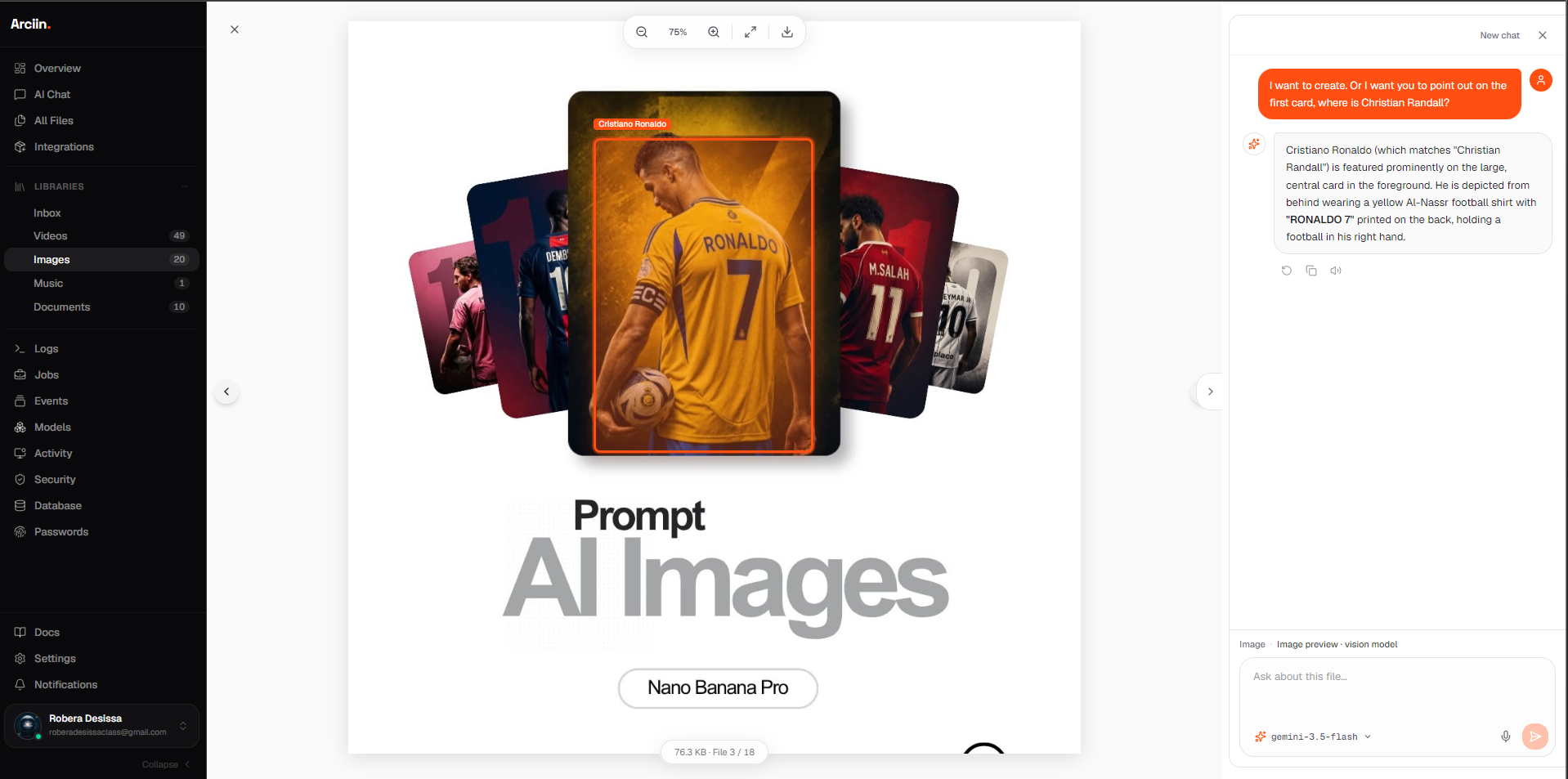
How it works
- 1Open Images in your library and select a file.
- 2Click Ask AI on the preview — the panel opens on the right.
- 3Ask a vision question — Arciin outlines subjects and cites text in the image.
- 4Use any connected model that supports vision (Gemini, GPT-4o, Claude, local Ollama, etc.).
Answers cite the files in your libraries. Nothing is indexed into a third-party model training pool.
Your server stays home.
Reach it on your terms.
Arciin runs on your LAN first. Add a custom domain, reverse proxy, or tunnel only when you want access from outside — no cloud account required.
Optional remote accessLAN first
http://arciin.local
Default after install — browse from any device on your network.
And more
Everything else in the box.
Upload queue
Retry failed uploads, pause the queue, and watch every file move from queued → ready.
Folder trees
Create folders inside any library. Move assets without losing metadata or activity history.
Import from URL
Paste a link and Arciin fetches the file, classifies it, and stores it on your disk.
PDF document details
Page count, author, and subject extracted on upload — shown in Overview for every PDF.
Assist (Pro)
Right-click any video or PDF for Assist: transcripts, AI rename titles, summarize, and keywords — gated like AI Chat.
Roles & invites
Owner, Admin, Member, Viewer — local users only, no per-seat billing.